Industrial automation depends on more than robots and production software. It also needs reliable interfaces where operators can monitor equipment, inspect alarms, and adjust processes. The International Federation of Robotics reported 541,302 industrial robot installations worldwide in 2023, with operational installations reaching about 4.28 million. These figures, published in World Robotics 2024, show the scale of automation infrastructure that industrial computers must support. They do not measure panel computer sales directly.
China is a central manufacturing base for this equipment. The National Bureau of Statistics of China reported that manufacturing value added grew 5.0% in 2023. For factories, an Industrial Panel Computer may sit beside a packaging line, control cabinet, or inspection station. It must remain readable, responsive, and stable amid vibration, heat, and continuous operation. The gap matters.
This overview examines leading Industrial Panel Computer manufacturers in China and the practical differences behind their product ranges. Buyers should compare processor options, screen sizes, enclosure protection, mounting methods, operating-system support, and service availability. Datasheets offer a useful starting point, but they rarely reveal how a unit performs after months of dust, heat, or frequent cleaning. Specifications are not everything. That limitation deserves attention. A shortlist should therefore weigh documented test conditions and support arrangements alongside price and advertised features.
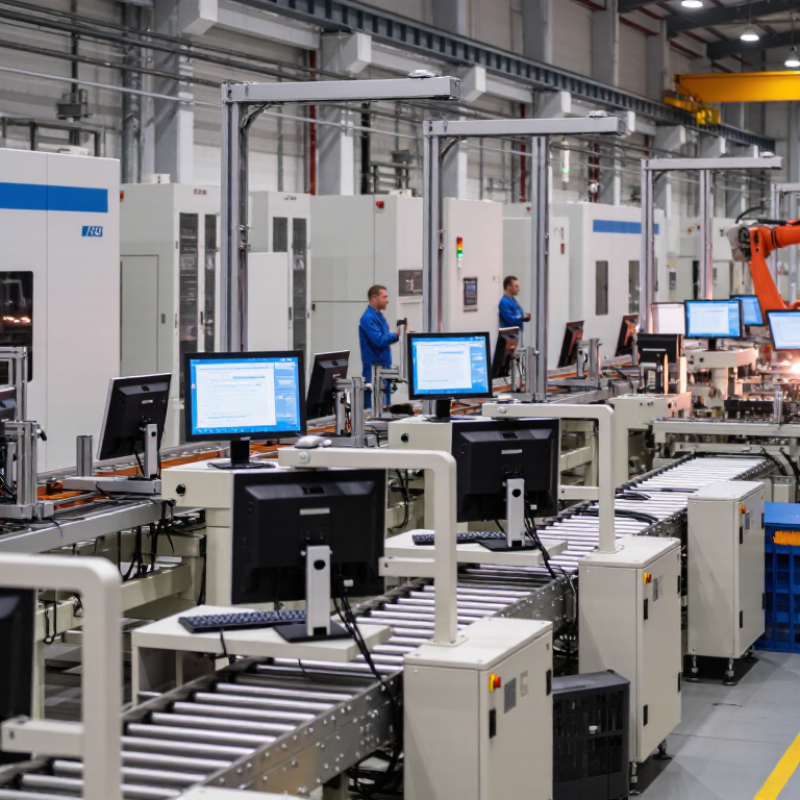
An industrial panel computer combines a display, touch interface, and computing hardware in one enclosure. It is designed to operate near machinery, where vibration, dust, and temperature changes can affect ordinary office equipment. Its sealed front bezel helps limit dust and moisture around the screen opening. The point is control. Operators can view machine status, enter settings, and acknowledge alarms without reaching for a separate keyboard. Inside, a processor and memory run monitoring, visualization, or control software suited to the installation. A plant engineer might mount one beside a packaging line and read production data through a bright, gloved-hand-friendly screen.
Core features often include a rugged housing, industrial-grade touchscreen, and interfaces such as Ethernet, USB, or serial ports. These connections let the computer communicate with sensors, controllers, and nearby equipment. Fanless designs can reduce moving parts and keep airborne dust from being drawn into the enclosure.
But fanless operation depends on good heat management. A hot cabinet can still shorten component life, so placement and ventilation matter. Screen brightness, touch response, and ingress protection should match the actual workspace, not just a specification sheet. A panel computer is not automatically suitable for every factory floor; checking temperature, mounting, and software needs before purchase prevents avoidable problems. Even careful selection involves trade-offs.
Industrial panel computers are designed around their working environment, not just screen size. Engineers assess temperature changes, dust, vibration, power supply, and mounting space before choosing components. A machine controller may need a sealed front surface, while a portable production unit may require reinforced connectors. Small details matter.
Designers create circuit layouts and enclosure drawings, then build prototypes for hands-on testing. The production line typically places components on circuit boards, assembles the display and housing, and connects ports, buttons, and internal cables. Thermal checks can reveal hot spots near processors. Engineers may adjust ventilation, component placement, or enclosure materials. A tidy CAD model can still mislead.
Each unit should undergo checks for touch response, display clarity, port function, and stable operation under load. Technicians also inspect seals, fasteners, and cable routing; a pinched wire can cause trouble later. Some design choices involve trade-offs: brighter screens may draw more power, and tighter sealing can make heat harder to manage. Testing helps, but it cannot reproduce every factory floor. The awkward edge case deserves another look.
Across China’s manufacturing hubs, industrial panel computers help operators monitor machines and respond to faults. On automotive assembly lines, they display work instructions, torque readings, and production status beside the equipment. A clear screen and glove-friendly touch input can save time during a shift. Dust, vibration, and temperature changes still challenge hardware. Small details matter.
Food-processing facilities use sealed panels to track temperatures, batch records, and cleaning cycles. The enclosure and connectors need to suit the actual washdown conditions, not just a product description. In warehouses, operators use panel computers to check inventory and coordinate conveyor systems. Ports and rail terminals rely on them for equipment status and dispatch information, where readable screens are useful in bright or dim conditions. Not always easy.
Energy sites may use panel computers to view pump, power, or environmental data from local control stations. Requirements vary by location, and one configuration rarely fits every task. Buyers should check operating temperature, mounting method, interface compatibility, and service access with the integrator. A neat specification sheet can still hide a poor fit. Real operating conditions deserve a closer look.
Leading industrial panel computer manufacturers in China serve automation, packaging, energy, and transport applications. Their strengths are practical: configurable displays, processor options, and support for varied installation environments. IFR’s World Robotics 2024 report recorded 276,288 industrial robot installations in China during 2023, representing 51% of global installations. That scale points to substantial demand for reliable operator interfaces, though it does not prove the quality of any individual supplier.
MarketsandMarkets estimated the global industrial PC market at 5.2 billion US dollars in 2023 and projected 7.6 billion by 2028. For buyers comparing Chinese manufacturers, useful checks include panel brightness under factory lighting, glove-compatible touch response, operating temperature, and long-term parts availability. Ask for test records, not only catalog claims. There is a catch. A polished specification sheet may not reveal how a unit handles vibration, dust, or years of continuous operation. Factory acceptance tests and a clear repair process matter; even good suppliers can leave gaps in documentation. More careful comparison beats choosing by price alone.
| Product Dimension | Common Market Options | Industrial Considerations |
|---|---|---|
| Display size | Common formats include 7-inch, 10.1-inch, 12.1-inch, 15-inch, 15.6-inch, and 21.5-inch displays. | Select a size that suits the available control-panel space and the distance from which operators will view the interface. |
| Display resolution | Depending on screen size and model, options commonly include 800 × 600, 1024 × 768, 1280 × 800, and 1920 × 1080. | Check that the resolution supports the application’s interface, graphics, and required on-screen information. |
| Touch technology | Projected capacitive and resistive touchscreens are widely offered; some systems are available without touch. | Capacitive touch is suited to multi-touch interfaces. Resistive touch can be useful where operators wear gloves or use a stylus, subject to the specific model. |
| Processor platform | Product ranges may include low-power x86 processors, higher-performance x86 processors, and ARM-based platforms. | Choose based on application workload, operating-system compatibility, power budget, and expected service life. |
| Operating system support | Common options include Windows, Linux, and Android, with availability dependent on the hardware configuration. | Confirm driver support, application compatibility, licensing requirements, and the vendor’s software maintenance arrangements. |
| Cooling design | Fanless designs are common for lower-power systems; higher-performance configurations may use active cooling. | Fanless construction can reduce moving parts, while thermal performance still depends on processor load, enclosure design, and ambient temperature. |
| Operating temperature | Published ranges vary by model; industrial products are often offered with specified extended-temperature options. | Use the datasheet for the exact temperature limits, and account for heat generated inside the installation enclosure. |
| Front-panel protection | Some panel computers specify IP65 protection for the front panel when installed as directed. | Front-panel protection does not automatically apply to the rear enclosure or connectors. Check the stated rating and installation requirements. |
| Mounting formats | Common configurations include panel mounting, VESA mounting, and open-frame installation. | Verify cutout dimensions, mounting depth, fastener arrangement, and access to rear connectors before selecting a unit. |
| Connectivity | Typical interfaces may include Ethernet, USB, serial ports, and display outputs; the exact port selection differs by model. | Check port count, connector type, network speed, and whether legacy serial equipment or external displays must be supported. |
| Power input | DC power input is common, with supported voltage ranges specified by the individual product. | Match the input range to the site’s power supply and review protection requirements for electrical noise and transients. |
| Typical applications | Machine control, production-line visualization, equipment monitoring, logistics, and industrial kiosks. | Environmental conditions, required certifications, software needs, and installation constraints should guide product selection. |
| Scope note: This table summarizes common product options and selection considerations in the industrial panel computer market. Specifications and availability vary by model; confirm all requirements against the relevant product datasheet. | ||
When comparing industrial panel computer manufacturers in China, match specifications to the actual factory floor. Grand View Research valued the global industrial PC market at USD 5.25 billion in 2023 and projected a 7.4% compound annual growth rate through 2030. That growth makes supplier claims plentiful, but not equally verifiable. Ask for the exact CPU, memory, storage, display brightness, and operating-temperature range—not just “industrial grade.” Check whether the quoted IP rating applies to the complete unit or only its front panel. Small detail. It changes installation planning.
Request test records for vibration, thermal cycling, electromagnetic compatibility, and burn-in, then confirm the test configuration matches your proposed model. Review the warranty, repair turnaround, spare-parts period, and documentation language. A low purchase price may become expensive if a replacement screen takes weeks. The 2024 IPC A-610 standard offers useful workmanship criteria for electronic assemblies, but it does not certify a finished panel computer; ask what inspection process the supplier actually uses. Factory audits and a pilot run can reveal assembly consistency, though one visit cannot prove long-term reliability. I would also compare two samples under the same shift conditions. Datasheets rarely capture glare, glove response, or cable strain. That part is easy to overlook.
Rob was always very honest and upfront about everything and took the time to explain everything I needed.
“highly recommended. They provided us with a great storage container with ontime services.”
“Bought a used container, its perfect, no leaks and in good condition.”
“Good service and prompt delivery. A great option for temporary storage at a decent price.”

Join our mailing list to get the latest storage container inventory and offers