Choosing the best Low Profile Cpu Cooler is not simply a search for the lowest temperature. In a compact PC, cooler height, memory clearance, case airflow, and noise can matter just as much. A model that performs well on an open test bench may struggle inside a cramped case. Fit comes first.
This guide compares the details that shape a practical choice: supported CPU sockets, stated height, fan size, cooling capacity, and installation requirements. It also considers independent test results when available, while recognizing that temperatures vary with the processor, workload, ambient room temperature, and case ventilation. A few degrees alone do not tell the whole story. Noise and ease of installation deserve attention, too.
Look closely at the measurements. Check your case’s cooler-height limit, then confirm nearby RAM and motherboard components will not block the heatsink or fan. Manufacturer specifications are useful, but they cannot replace checking your exact build. Even a careful recommendation has limits; compatibility lists may not cover every unusual layout. That part is easy to miss.
The right choice balances cooling, clearance, acoustics, and price for your own system. There is no universal winner. A modest cooler may be the smarter option for a low-power processor, while a demanding chip may need stronger airflow and more headroom. This comparison helps narrow the field without treating a single benchmark as the final answer.
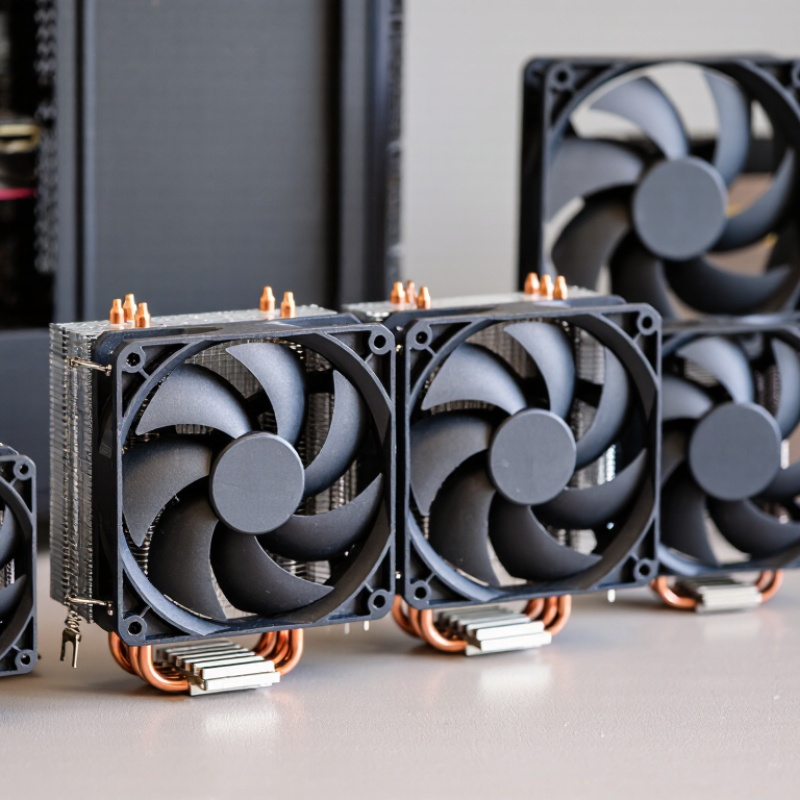
A low-profile CPU cooler is designed to fit where a standard tower cooler cannot, usually in a compact case with limited vertical clearance. There is no universal height cutoff. Many models sit roughly 40 to 80 millimeters tall, but the case maker’s cooler-clearance limit is what matters.
Measure from the CPU surface to the side panel, allowing a little room for installation. Measure twice.
The shape matters as much as height. A low-profile cooler often spreads a shallow fin stack over the processor, with a fan pushing air downward or sideways. Check whether that layout crowds nearby memory, power components, or a graphics card. A cooler may fit on paper and still make assembly awkward. That matters.
Also compare the cooler’s heat capacity with the processor’s sustained power use, not just its advertised peak rating. Smaller heatsinks have less metal to store and release heat, so fan speed and noise can rise under long workloads.
I would treat “low-profile” as a fit category, not a promise of quiet operation or high cooling performance. Case airflow can change the result, and this is where spec sheets sometimes leave out useful detail.
A low-profile CPU cooler removes heat through a short, carefully arranged path. The processor warms a metal contact plate pressed against its surface. Heat then travels into heat pipes, which contain a small amount of working fluid. As the fluid evaporates near the processor, it carries heat toward cooler sections of the pipes.
There, the vapor releases heat into thin metal fins and condenses. A fan pushes air across those fins, carrying warmth away from the cooler and into the computer case. That airflow matters. Dust, blocked vents, or a cramped case can slow heat removal, even when the cooler itself seems capable. Small details count.
Choosing the best model means checking more than its height. Compare its rated cooling capacity with the processor’s power needs, and confirm it fits the case and nearby memory modules. Fan noise and airflow direction also affect everyday use. A compact cooler may keep a moderate-power system stable, but it can struggle under sustained heavy workloads. The limit is easy to underestimate; real temperatures depend on the whole system, not one component alone.
Heat travels from the CPU into the cooler’s base and fins. A fan pushes air across the fins, carrying heat away from the cooler. The chart estimates how much heat the airflow can carry when the air warms by 8°C.
Estimates use air density of 1.2 kg/m³ and specific heat capacity of 1,005 J/(kg·°C). Actual cooling depends on fin design, fan performance, and temperature conditions.
Before choosing a low-profile CPU cooler, check the case’s maximum cooler height. Measure from the processor’s top surface to the side panel, then compare that space with the cooler’s listed height. A few millimeters can matter. Case specifications may be rounded, so leave a small clearance rather than relying on a perfect fit.
Also inspect your motherboard layout. Tall memory modules, large power-delivery heatsinks, or nearby expansion cards can obstruct a cooler even when its height is suitable. Look at a layout diagram, then compare it with the actual parts.
Verify that the cooler includes mounting hardware for your processor socket and motherboard. Socket support can vary between revisions, so check the cooler’s current compatibility information, not just an old listing. Check fan direction and nearby fan headers, too; a cable pressed against a blade is an easy detail to miss.
Do not choose by processor power rating alone. Cooling also depends on sustained workload, case airflow, and power settings. A compact cooler may handle everyday tasks well but run louder under long, heavy workloads.
Compatibility charts help, but they are not foolproof. Confirm dimensions, RAM clearance, and mounting support against your exact components.
A low-profile CPU cooler is a compromise shaped by the case, not just the processor. Its short heatsink can fit beneath a compact side panel, but limited fin area may leave less room to shed heat during long, heavy workloads. A top-down fan can also move air around nearby components. Useful, though the effect depends on the case layout. Check cooler height against the actual clearance, and leave space for tall memory modules.
Cooling comparisons are meaningful only under similar conditions. Use the same processor, workload, case airflow, and room temperature; otherwise, a few degrees can be misleading. Noise deserves the same care. A small fan may spin faster under load, producing a sharper whir, while a larger fan can often move air more gently. Listen from your usual seating distance, not with your ear beside the open case. That changes everything. Fan curves also matter: an aggressive setting can make a capable cooler seem unpleasant. I would not judge by peak temperature alone; brief bursts and sustained rendering feel different in daily use. And, honestly, published test setups rarely match every cramped build.
Choosing a low-profile CPU cooler starts with measurements, not a product photo. Check the cooler’s listed height against the case’s maximum clearance, leaving room for any side panel padding. Measure twice. Then check whether the heatsink overlaps the memory slots or nearby motherboard components. Tall memory can turn an otherwise compatible cooler into a frustrating fit.
Next, match cooling capacity to your processor and workload. A system used for browsing and light office tasks has different needs from one handling long rendering sessions. Check the processor’s power limits and independent temperature tests, rather than relying on a single advertised wattage figure. Small coolers have less surface area, so airflow matters: a clear path from the case intake to the exhaust can help prevent heat from lingering.
Noise deserves a practical check, too. Fan specifications do not always predict how a system will sound inside your case. Look for testing under sustained load, and consider whether the fan curve can be adjusted. One detail is easy to overlook: a cooler may fit perfectly yet run louder than expected. If possible, compare measured temperatures and noise at similar workloads. The “best” choice is the one that fits your actual space, use, and tolerance for sound.
Rob was always very honest and upfront about everything and took the time to explain everything I needed.
“highly recommended. They provided us with a great storage container with ontime services.”
“Bought a used container, its perfect, no leaks and in good condition.”
“Good service and prompt delivery. A great option for temporary storage at a decent price.”

Join our mailing list to get the latest storage container inventory and offers